

Test Cases, Test Suites & the Test Runner
This release turns Scout into a full test-management workspace. You can now save reusable test cases, group them into test suites, and run them—individually or as a batch—from a new Test Runner that executes cases in parallel and replays passing runs deterministically.What’s New
Test Cases — reusable, two ways to write them Save a scenario once and run it whenever you need to. Write a test case as explicit step-by-step instructions (with optional preconditions, expected results, and test data) or as a high-level intent that Scout interprets and adapts to your UI. Find them under Library → Test Cases.Test Suites — group and run as a batch Bundle related cases into named, ordered suites—Smoke regression, Checkout flows, Auth—under Library → Test Suites. Reorder cases, reuse a case across suites, and load a whole suite into the Test Runner in one click.Test Runner — run everything in parallel The new Test Runner runs your cases against any Target URL. Load cases from your library, from a suite, or by pasting JSON, then hit Run. Each case executes independently in its own browser session, so a batch runs in parallel with live status streaming into an execution grid—passed, failed, blocked, running, and queued—plus per-case step progress and links to the full execution and any bug reports.Deterministic replay with Playwright The first time a step-by-step case passes, Scout records a deterministic Playwright script of exactly what it did. After that, Re-run with Playwright replays the case verbatim—no AI, fully repeatable—and you can Download script to run it in your own pipeline.Parallelism respects your plan’s limits: Vibe runs up to 5 concurrent cases and Ship up to 10. Extra cases wait in the queue and start as slots free up.
Improvements
- New Test Runner, Test Cases, and Test Suites entries in the project sidebar
- Run history shows each case’s Last run time at a glance
- Paste-as-JSON support in the Test Runner for ad-hoc and CI-driven runs
Read the docs
Learn how to write test cases, build suites, and run them in parallel.
Smart Mode, Fix with Coding Agents & API Key Management
This release introduces Smart Mode — a new way to test using natural language intent — along with one-click bug fixing via coding agents, CLI issue verification, and self-service API key management.What’s New
Smart Mode — Intent-Based Testing (New Default) Scout now understands what you want to test, not just where. Smart Mode is a new default testing mode that interprets your natural language input and automatically selects the right workflow, depth, and tools for the job.Just describe your intent and Scout figures out the rest:- Test as a user persona — “Test the checkout flow as a first-time mobile user”
- Execute test cases — “Smoke test login, signup, and password reset”
- Verify bug fixes — “Verify the cart total bug is fixed after my latest deploy”
- Validate a PRD or user story — “Test the user story: users can reset their password via email link”
- Run an accessibility audit — “Check WCAG compliance on the dashboard page”
- Exploratory testing — “Explore the settings page and look for UX issues”
Smart Mode is now the default for all new executions. Your existing Quick and Deep modes still work exactly as before.
Improvements
- Increased concurrency limits for Vibe and Ship plans
- Custom instruction limit raised from 2,000 to 5,000 characters
- Compact mode selector with hover attribute bars for a cleaner UI
- Recurring issues now appear in execution summary emails
- Docs and changelog links added to the header dropdown
Bug Fixes
- Fixed intent-based workflow crashing on certain error conditions
- Fixed Playwright MCP middleware not being passed to instruction-based agent
- Fixed plan resolution using the highest plan from user balances
- Fixed stale plan display after subscription upgrade
Roast Enhancements, Unattended Executions & Test Result Reports
This release polishes the Website Roast experience, adds smarter background execution handling, and improves how you view and share test results.What’s New
Roast UI Overhaul The Website Roast experience is now more fun and engaging with memey language, playful animations, and improved sharing options. The roast landing page and result cards have been refreshed for a more entertaining experience.Unattended Auto-Continue for Background Executions Scheduled runs, evaluations, verifications, and roasts now automatically continue past step limits when time remains, instead of pausing and waiting for input. Background executions run more smoothly without manual intervention.Report Summary Card Test results now include a visual summary card showing your site’s validation status, quality rating badge, and severity breakdown — both on the share page and in execution details.Share Dialog for Reports A new share dialog on report pages makes it easier to share your test results with teammates or stakeholders.Early Finish Hint A placeholder in the chat input now hints that you can finish a test session early, making the workflow more discoverable.Stuck vs. Blocked Test Steps The todo node UI now clearly distinguishes between stuck and blocked states, so you can quickly understand why a test step hasn’t progressed.Improvements
- Renamed “Execution report” to “Test result” across the platform for clearer terminology
- Simplified execution header with a help popover and sign-in call-to-action
- Replaced the login teaser modal with a less intrusive inline banner
- Updated report header button styling for better visual consistency
Bug Fixes
- Fixed S+/S- grade handling and validation status logic
- Fixed missing OG image metadata on report share pages
Website Roast, Mode Selector & Observation Feedback
This release introduces the Website Roast workflow, a new testing mode selector, smarter observation feedback, and many quality-of-life improvements across the platform.What’s New
Website Roast Get a fun, shareable quality assessment of any website. Scout’s new Roast workflow analyzes your site and delivers a brutally honest (but helpful) quality report — complete with a shareable gallery, badges, and social-ready OG images.Quick/Deep Mode Selector You can now choose between Quick and Deep testing modes directly from the chat input. Quick mode gives you a fast overview, while Deep mode runs a thorough analysis. Anonymous users are prompted to sign up for Deep mode access.Observation Feedback in Chat When Scout identifies duplicate observations or dismisses non-issues, you now see exactly why — with clickable outcomes in the chat panel. Duplicates link to the original issue, making it easy to track recurring patterns.Check Emails Tool Scout can now check emails during testing sessions, with a dedicated mail icon and UI rendering support for email verification workflows.Social Sharing for Reports Share your test results on social media directly from the report share dialog with new sharing buttons.Facehash Default Avatars Users without profile images now get unique, auto-generated avatars based on their identity — no more generic placeholders.Inline URL Input The execution dialog has been replaced with a streamlined inline URL popover, making it faster to start new test sessions.Bug Verification from Issue Detail You can now trigger bug verification directly from the issue detail view, making it quicker to confirm whether an issue is still reproducible.Critical Graph Issue Preview Click on nodes in the critical issue path graph to preview issue details and open the full issue drawer without leaving the graph view.Improvements
- Magic link expiry extended to 6 hours for a more flexible login experience
- Added spam folder reminder to magic link success message
- Improved login teaser dialog responsive layout
- Enhanced execution report accessibility
- Redesigned verification section with updated done step UI
Bug Fixes
- Fixed magic link invalidation by email scanners — links now support multiple uses
- Fixed dynamic URL and description layout for OpenGraph images
- Fixed og:title, og:url, and Twitter metadata for report shares
- Fixed report completion card appearing when user continues chat
- Added 404 page for inaccessible executions
- Fixed agent prompt/response status leak
Knowledge Base, Bug Verification & Enhanced Reporting
This release introduces powerful knowledge management capabilities, smarter bug verification workflows, and significant improvements to reporting and user experience.What’s New
Knowledge Base Management Scout now features a dedicated Knowledge Base where insights from your testing sessions are organized and accessible. Combined with a new Project Summary view and Application Graph (moved to Knowledge tabs), you get a comprehensive understanding of your application’s structure and testing history.Bug Verification by Re-running Related Flows When Scout finds a bug, you can now verify it by re-running only the specific flow that triggered the issue. This targeted approach saves time and provides faster confirmation of whether bugs are reproducible or have been fixed.Smarter Issue Detection Scout now automatically converts observations into trackable issues and links related executions, helping you understand patterns across multiple test runs.Critical Issue Path Graph Visualize the paths that lead to critical issues in your application. This new graph helps you understand how users might encounter bugs and prioritize fixes based on impact.Quality Validated Badge Share your testing results with a beautiful quality badge. Each execution now generates a shareable badge showing your site’s quality rating, issue breakdown, and validation status. Report Enhancements
- Markdown download support for report share links
- Automatic 30-word summary generation for execution reports
- Suggestion buttons for agent questions make it easier to respond during testing sessions
- Loading states on chat submit/stop buttons provide clearer feedback
create-execution and send-message commands, making it easier to integrate into CI/CD pipelines.Tet Holiday Theme
Celebrate Lunar New Year with a special Tet holiday theme for the bunny hop game.Improvements
- Improved Vibe CTA scrolling and URL input focus
- Better table styling in chat markdown
- Updated color scheme for better visibility
- Streamlined welcoming email
- Relaxed report schema requirements for more flexible report generation
Bug Fixes
- Fixed broken image display in lightbox when load fails
- Fixed report display when classification is mixed
- Improved project access validation
- Fixed duplicate tool call handling in agent responses
Scout CLI & Vibe Testing Tools
This release introduces the Scout CLI for terminal-based testing, along with integrations for Claude Code and Kiro IDE. Plus, improvements to schedule management, issue tracking, and overall platform reliability.What’s New
Scout CLI Run AI-powered exploratory tests directly from your terminal. The new Scout CLI brings vibe testing to your command line—test web applications, run accessibility audits, and validate user flows using natural language commands. Perfect for CI/CD integration and developers who prefer the terminal.Improvements
- Weekly summary email reminders to keep you informed of testing activity
- Welcoming email for new users with helpful onboarding information
- PostHog integration for A/B testing and user behavior insights
- Agent connection status events with idle-aware keepalive
- Performance improvements to agent tool result handling
- BRIN index optimization for faster stream cleanup
- Improved error classification and benchmark metrics
Bug Fixes
- Fixed preview image display in execution details
- Resolved Playwright MCP download issues
- Fixed chat sync context handling
- Improved handling of server URLs with trailing slashes
Automated Testing & Smarter Planning
This release introduces powerful automation capabilities that let Scout work for you around the clock, plus significant improvements to test planning and overall reliability.What’s New
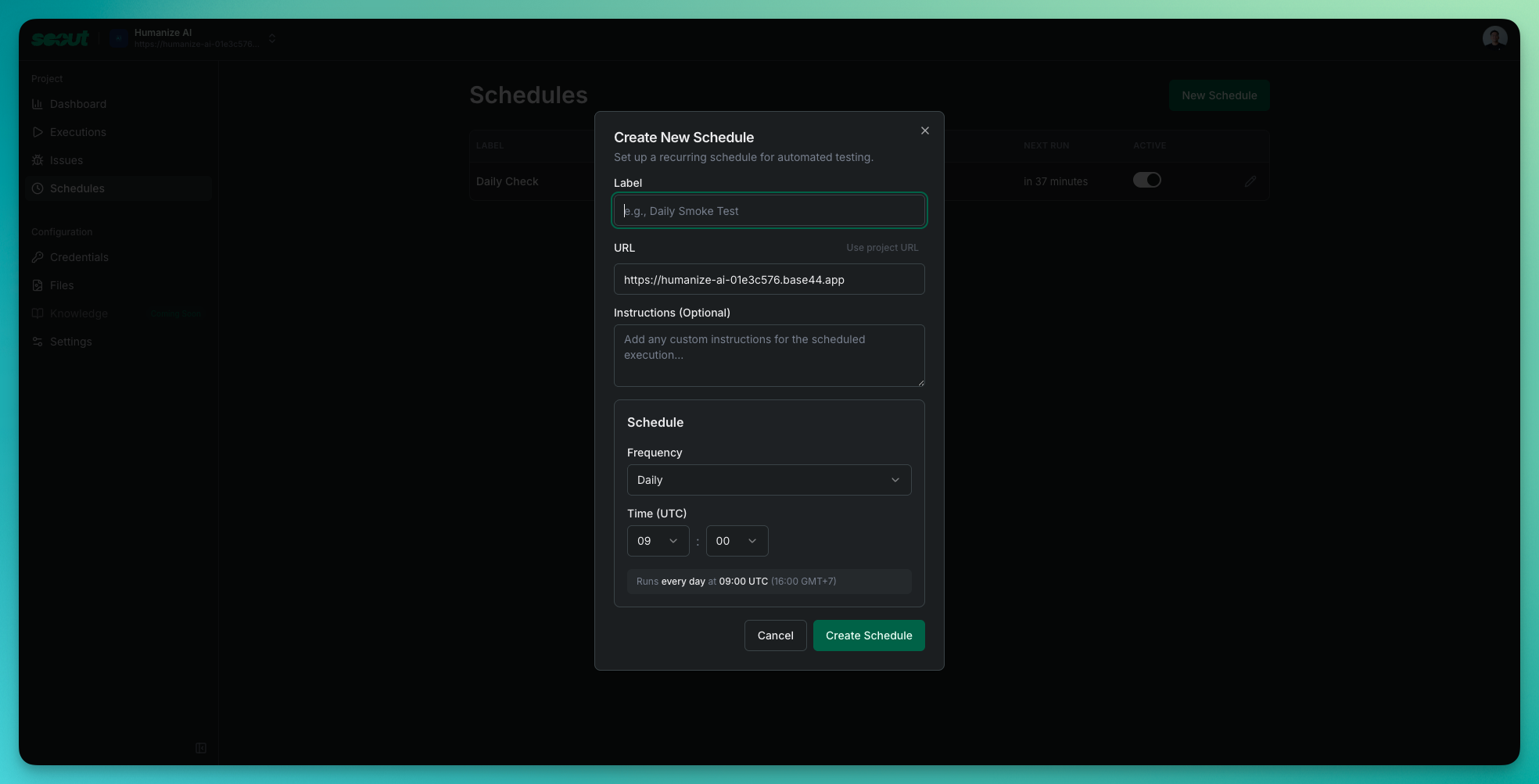
Project Scheduling Set up automated test runs that execute on your schedule. Configure recurring tests for your projects—daily smoke tests, weekly regression checks, or any custom schedule that fits your workflow. Scout will automatically run your configured tests and track results over time, helping you catch regressions before they reach production. Manage all your schedules from the new dedicated Schedules page in your project dashboard, where you can create, edit, pause, or delete scheduled runs with ease.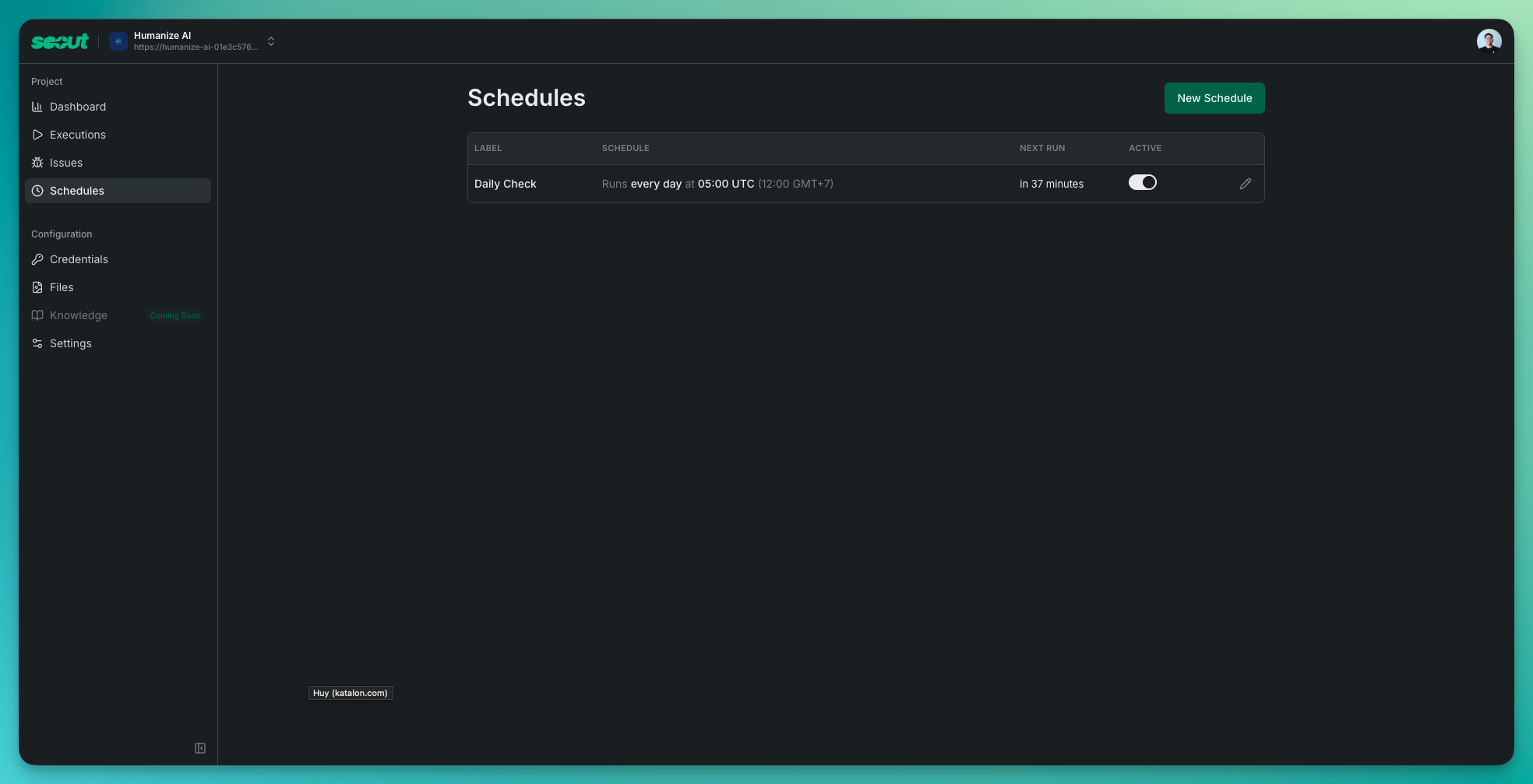
Improvements
- Smoother chat experience with reduced UI lag
- More reliable agent behavior with fewer incorrect tool executions
- Improved pagination with proper page numbers and mobile optimization
- Better timeline status display and visual refinements
- Enhanced “Help Unstuck” dialog for clearer guidance when tests need intervention
- Improved landing page pricing cards and footer layout
Technical Improvements
- Security updates and dependency upgrades
- Performance optimizations and code cleanup
- Infrastructure reliability enhancements
Reliability, Polish & Performance
This release focuses on making Scout more reliable on complex websites, streamlining issue management, and improving the overall experience with thoughtful UX enhancements.What’s New
Improved Agent Reliability on Complex Websites Scout now works reliably on complex e-commerce and content-heavy sites. We’ve optimized how the agent captures page snapshots—blocking 200+ ad/tracker domains and intelligently reducing page data without losing important context. Sites like Amazon that previously caused issues now work smoothly.Streamlined Issue Management Managing issues just got a whole lot easier:- Dismiss with a reason: When dismissing an issue, you can now explain why (up to 500 characters). Great for team communication and future reference.
- Unified status dropdown: Manage issue status from a single control—Open, Dismiss, or Resolve—with undo support for safety.
- Quick issue review: Click any issue row to open a detail panel without leaving the list. Review multiple issues faster.
- Cleaner issues table: Reduced visual clutter with a more focused layout.
Improvements
- Faster Return to Work: Scout remembers the last project you were working on. When you log back in, you’re taken straight there instead of starting from the project list.
Security Updates
- Next.js upgraded to 15.5.9 (security patches)
A Fresh New Way to Watch Scout Work
We’ve been listening to your feedback, and this release delivers a major upgrade to how you experience Scout. Say hello to a cleaner, more intuitive execution interface—plus some powerful new ways to manage your projects.What’s New
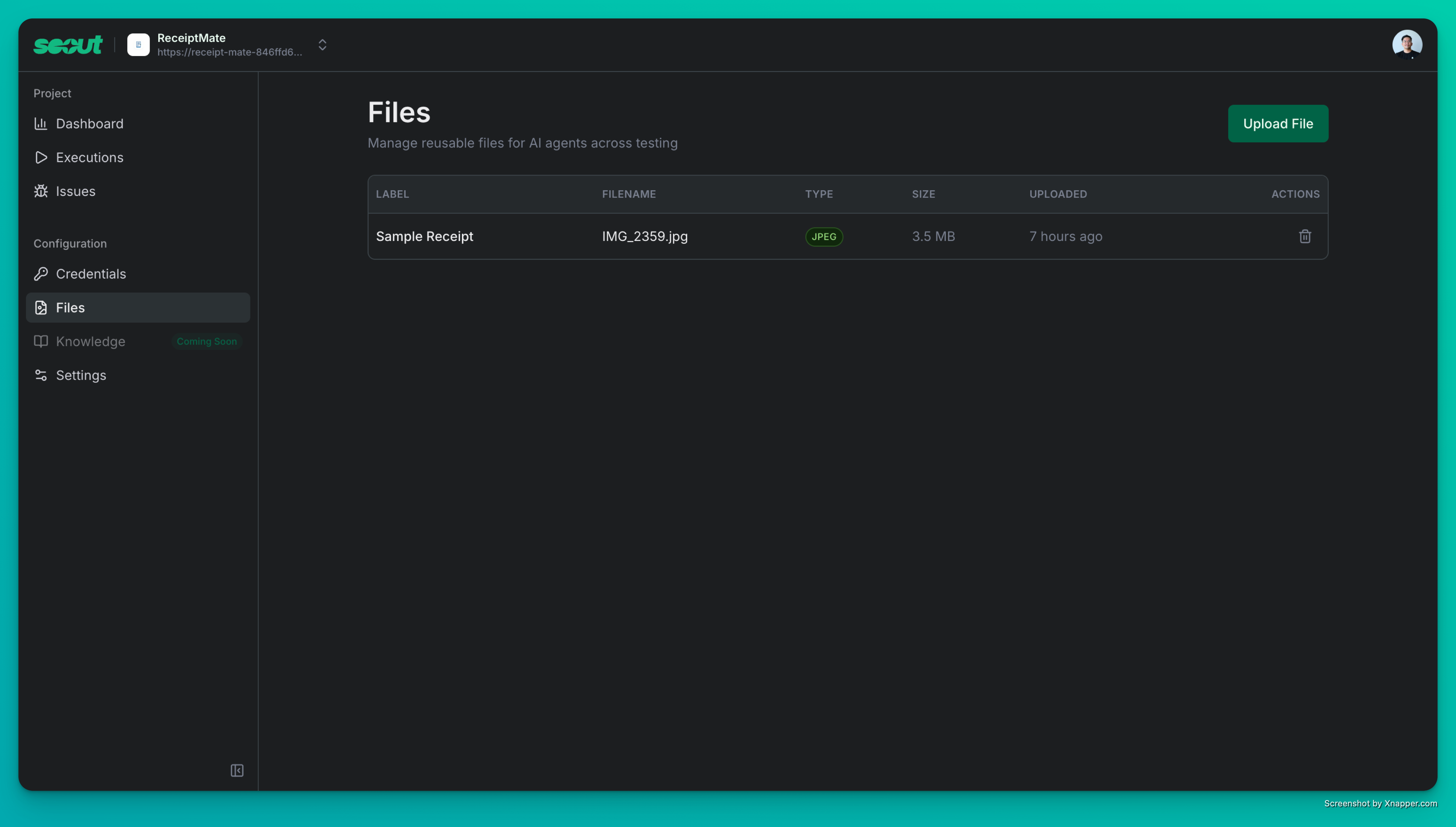
Completely Redesigned Execution UI This is the big one! We’ve split the execution view into two dedicated panels: one for tracking progress, one for the chat. No more juggling between what Scout is doing and what it’s saying. Everything is exactly where you’d expect it to be, and monitoring long test runs has never felt smoother.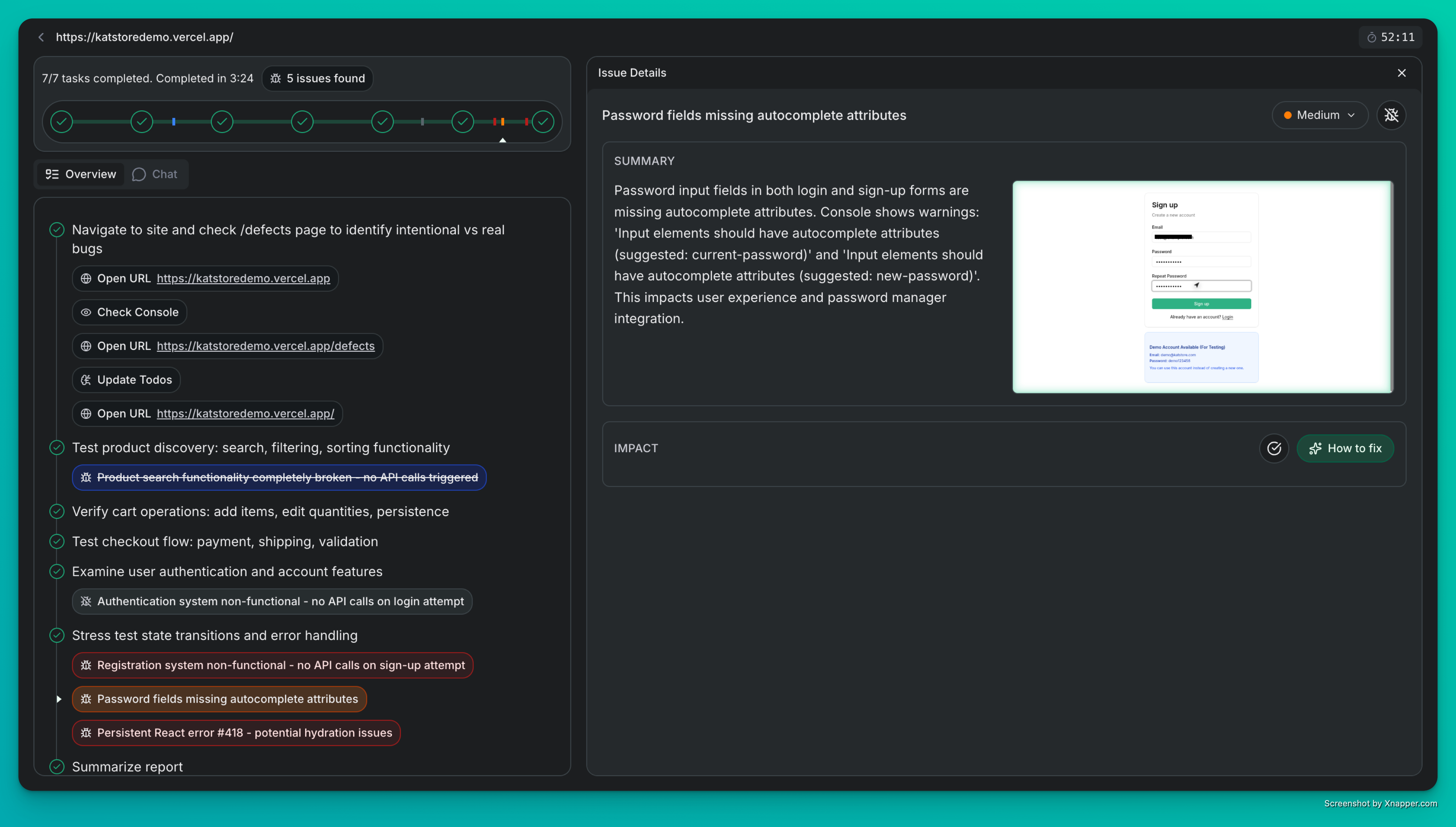
Improvements
- Cleaner Screenshots: Debug overlays now hide automatically during capture—no more visual clutter
- Better Cursor Tracking: Improved positioning and labels make it easier to follow Scout’s actions
- Faster Quick Bug Finder: We’ve optimized page analysis for noticeably speedier results
- Rock-Solid Sessions: Browser timeouts now work exactly as expected
- Graceful Recovery: Tests keep running smoothly even when network hiccups happen
- Always Fresh Data: Pages auto-refresh when you come back to them
- Security Updates: Dependencies upgraded to keep everything locked down
Bug Fixes
- Screenshots now display correctly in historical chat views
- Chat input auto-resize works properly (no more hydration weirdness)
- Issue updates sync instantly across the UI
- Project credentials inject reliably every time
- Caching issues resolved—you’ll always see the latest run info
Session Replay & Enhanced History
This release introduces powerful historical replay capabilities, improved chat history, and significant visual refinements.What’s New
Historical Replay We’ve added screenshot persistence and historical replay, allowing you to review past execution states and visually retrace Scout’s steps.Enhanced Chat History Chat history now preserves tool calls and context, making it easier to understand previous interactions and pick up where you left off.Scout Overlays New visual overlays provide better visibility into the agent’s actions and focus areas during execution.Improvements
- Todo List Stability: Todo items now maintain their order correctly when updated.
- Visual Refinements: Updated color schemes for better element distinction and readability.
- Performance: Optimized tool result streaming to reduce unnecessary computation.
- Security: Upgraded core dependencies to address security vulnerabilities.
Enhancements & Bug Fixes
This release focuses on enhancements to the chat experience, security improvements, and several key bug fixes.What’s New
Resume Chat Stream Users can now resume their previous chat sessions, allowing for a seamless continuation of testing workflows.Security Enhancements We’ve implemented additional security measures to ensure your data and testing environments remain secure.Assistant Notifications Scout now informs you when the maximum step limit is reached and requests your input on how to proceed, giving you more control over long-running executions.New Todo/Issue Features We’ve added new variants for the todo dot and improved how you track and manage findings for better issue visibility.Improvements
- Pagination for Credential Page: Added pagination to handle large numbers of credentials efficiently.
- Horizontal Scroll in Executions: Enabled horizontal scrolling in the executions table for better visibility of wide content.
- Duplicate Issue Handling: Implemented early returns for duplicate issues to reduce noise.
- Working Memory Conflict: Resolved a conflict in working memory to improve agent stability.
Enhanced Reporting & Issue Management
An important interim release preparing the foundation for next week’s major UI overhaul. This update brings a completely reworked reporting system and improved issue management to help you track findings more effectively.What’s New
Redesigned Report System We’ve rebuilt our reporting infrastructure from the ground up in preparation for the new UI launching next week. The re-worked report system provides a cleaner structure and better organization, making it easier to understand Scout’s findings at a glance.Improved Issue List Management Issues now append to the bottom of the issues panel, creating a more intuitive chronological flow. This improvement ensures you can track new findings as they appear without losing context from earlier discoveries.Execution Timeline Component Visualize your test execution progress with the new execution timeline component, providing better insights into how Scout navigates and explores your application over time.Improvements
- Enhanced report structure for better readability and organization
- More consistent status display between execution tables
- Improved issue panel ordering for better tracking
- Timeline visualization for execution progress
- Foundation work for next week’s major UI update
Coming Next Week
Stay tuned for a major UI refresh that will transform how you interact with Scout. This release sets the stage for those exciting changes!Quick Bug Fighter & Enhanced Reliability
A focused release bringing a powerful new workflow for rapid bug discovery, enhanced authentication reliability, and numerous quality-of-life improvements across the interface.What’s New
Quick Bug Fighter Workflow Discover bugs faster with our new Quick Bug Fighter workflow. This streamlined testing mode is designed for rapid issue detection, complete with review and rerun capabilities to iterate quickly on your findings.Credentials Management Securely store and manage authentication credentials for your projects, making it easier to test authenticated areas of your applications without manual login steps.Custom 404 Page No more generic error pages—Scout now displays a helpful custom 404 page when you wander off the beaten path, making navigation errors less jarring.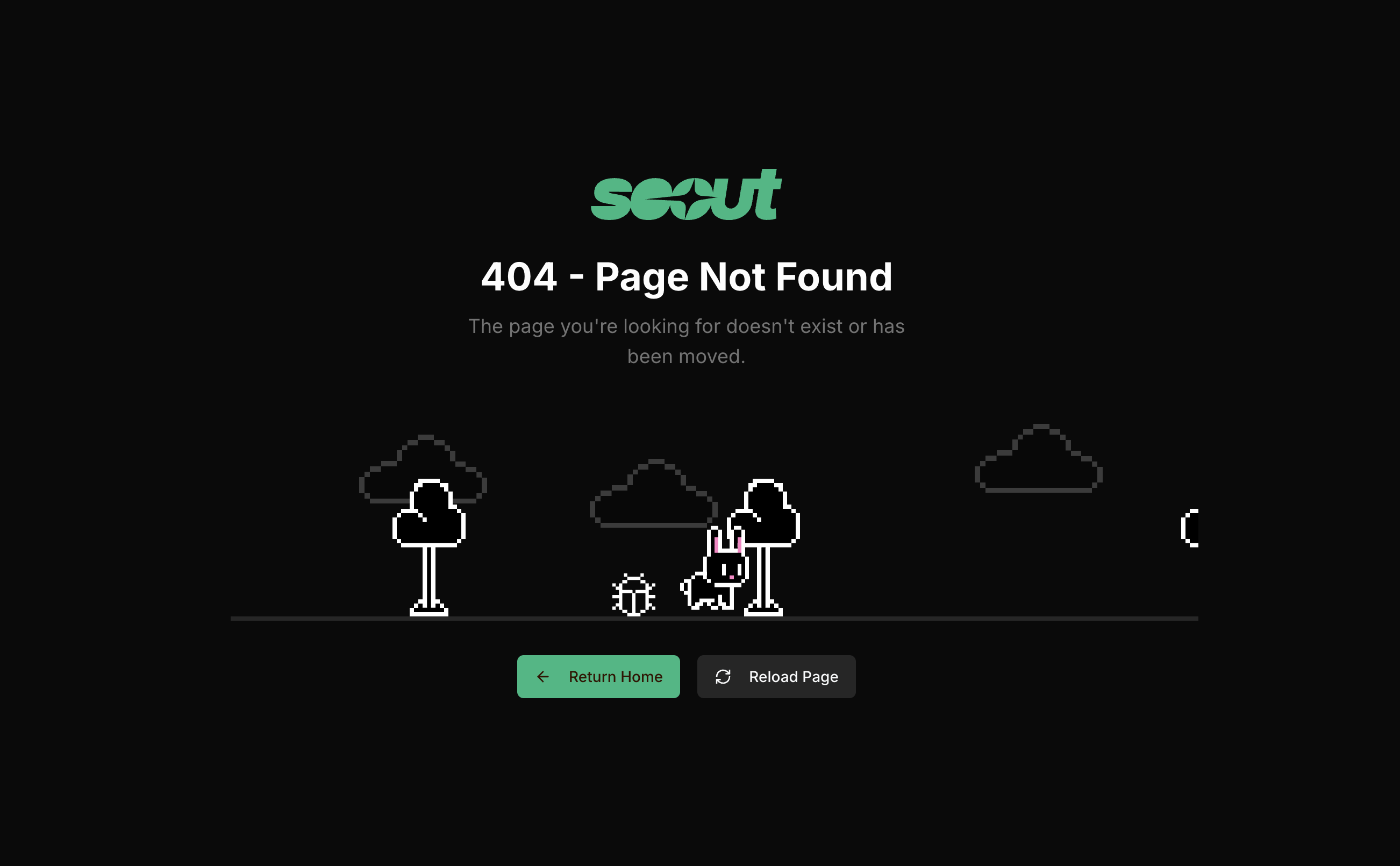
Improvements
- Google login now shows a proper loading state during redirects, eliminating confusion
- Fixed redirect behavior after Google login and logout for a seamless experience
- Resolved confusing redirects from the homepage for logged-in users
- Extended magic link validity to 30 minutes, giving you more time to complete sign-in
- Fixed rerun functionality for private executions—now you can reliably rerun any test
- Improved Quick Bug Fighter report completion to properly enable review and rerun actions
- Long URLs no longer break the layout—text wraps gracefully
- Avatar images now load smoothly with skeleton placeholders for a more polished feel
- Enhanced security with the latest authentication and dependency updates to keep your data safe
Multi-Project Workspace & Agent Improvements
A major release focused on organization and flexibility. Scout now supports multiple project workspaces, enhanced onboarding, and more powerful agent configuration options.What’s New
Multi-Project Workspace Organize your testing with dedicated project workspaces that keep everything connected. Create projects, switch between them seamlessly, and let Scout automatically populate project details from your URLs. Each project gets its own dashboard with test insights and quick access to create new executions.Enhanced Test Execution Management Search executions by URL, filter by status (completed, running, queued, failed, canceled), and rerun any execution with a single click. Share public execution results via/t/{executionId} links and enjoy a revamped execution details page with improved layout and information display.Guided Onboarding Experience
New users now get a smooth two-step onboarding flow that walks them through creating their first project. Simply enter a URL, and Scout fetches metadata to auto-populate project names and logos. Enhanced sign-in with magic link email authentication and Google OAuth support.Improvements
Project Management- Project switcher in navigation for quick context switching
- Project dashboard with test insights and execution history
- Project settings page for editing and deletion
- Automatic website metadata fetching for project setup
- Website metadata scraper endpoint (
/api/v1/meta) for fetching titles, descriptions, and favicons
- Magic link email authentication
- Google OAuth integration
- API key authentication support for programmatic access
- Real-time streaming API for agent responses
- Chrome DevTools MCP integration updated to v0.9.0
- Refactored agent streaming architecture with
startAgentStream
- Improved color contrast and theming throughout the interface
- Fixed button alignments and layout issues
- Better URL normalization and validation
- Optimized frontend build process
Under the Hood
- Introduced
@katalon-studio/scout-commonshared package for type definitions and schemas - Benchmark result caching during synchronization
- Enhanced agent streaming architecture for better performance
Smarter Testing & Smoother Experience
We’ve been busy making Scout more intelligent and delightful to use. This release brings enhanced AI capabilities, mobile support, and a bunch of quality-of-life improvements.What’s New
Mobile-Ready Execution Page Monitor your testing sessions from anywhere! The execution page now adapts beautifully to mobile devices, so you can keep tabs on Scout’s progress whether you’re at your desk or on the go.Shared Context Intelligence Scout just got smarter. We’ve evolved our memory system to use shared context bundles, enabling Scout to generate more coherent and contextual test reports by understanding relationships across your entire testing session.Dynamic Browser Management Scout now intelligently manages browser resources, launching and cleaning up browser sessions on-demand for better performance and lower resource usage.Improvements
Cleaner, More Readable Reports We’ve refined the structured report design with improved font contrast and removed redundant execution metadata, making it easier to scan and understand your test results at a glance.Enhanced Email Experience Updated our magic link email template with engaging “vibe testing” branding and clearer security messaging—because even authentication emails should spark joy.Full AI Transparency Ever wondered what parameters Scout is using? The webapp now displays tool call parameters, giving you complete visibility into how our AI agent makes decisions during exploration.Polished Theming Refreshed our UI theming standards for a more consistent and cohesive visual experience throughout the application.Under the Hood
- Optimized report generation with a dedicated AI model for higher quality structured reports
- Fixed structured report streaming for smoother real-time updates
- Resolved flashing LiveView issues during sub-agent executions
- Added TTL support for CDP connections and live view URLs to automatically clean up stale sessions
- Updated to latest better-auth package with security improvements
- Enhanced AI agent prompts for improved testing accuracy
- Improved JSON Schema compatibility across the system
Interactive Live View & Enhanced Reporting
A major update focused on improving user interaction and transparency.Homepage Updates
- Scout by the Numbers: Live statistics dashboard showing URLs tested, total executions, and bugs found across all Scout users
- Discord Channel: Join our community to share feedback, ask questions, and connect with other Scout users
- Cal.com Integration: Easy scheduling to book time with our team for support or demos
Product Improvements
- Interactive Live View: Users can now pause the chatbot and interact directly with the live view to help Scout bypass login screens, solve captchas, and navigate complex authentication flows
- Better Structured Reports: Enhanced report format with clearer organization, categorized findings, and improved readability
Initial Release
We’re excited to launch the first version of Scout, your AI quality companion for high-velocity development.Core Features
- Instant Run with URL Input: Simply paste your application URL and Scout starts exploring immediately
- Simple Chat Window: Interact with Scout through an intuitive chat interface to guide explorations
- Live View: Watch Scout navigate your application in real-time with a view-only live feed
- Text-Based Reports: Receive detailed, text-based exploration reports with findings and recommendations
Supported Platforms
- Quick Run support for Lovable and Replit applications
- Simple URL transformation pattern for instant exploration
New to Scout? Check out our Quickstart guide to launch your first exploration in under ten minutes. Have feedback or suggestions? Contact our team - we’d love to hear from you!